 Atari BASIC A, B, and C
Notes:
Atari Basic does not have a CLS or CALL CLEAR command.
Instead use PRINT CHR$(125)
Atari BASIC does not have a VERSION command.
Instead use 100 PRINT PEEK(43234)
 Atari BASIC A, B, and C

Notes:
  Atari Basic does not have a CLS or CALL CLEAR command.
     Instead use PRINT CHR$(125)
  Atari BASIC does not have a VERSION command.
     Instead use 100 PRINT PEEK(43234)
Variable names may be up to 120 characters long.
Variable names must start with an alphabetic letter, and may contain
only capital letters and numerical digits.
ATARI BASIC limits the user to 128 different variable names.
ABS(numeric-experssion)
Returns absolute value. Always a non negative number.
Examples:
100 PRINT ABS(42.3)
100 VV=ABS(-6.124)
ASC (char)
Returns numeric value of a single character.
ATN(numeric-expression)
Returns trigonometric Arctangent - the angle (in radians) whose tangent is x.
Examples:
100 PRINT ATN(5)
100 PRINT ATN(.4)
COLOR numeric-value
Examples:
100 COLOR 1
HUE
Number Color
0 Gray
1 Gold
2 Orange
3 Red-Orange
4 Pink
5 Violet
6 Purple Blue
7 Blue
8 Light Blue
9 Blue-Green
10 Turquoise
11 Green-Blue
12 Green
13 Yellow-Green
14 Orange-Green
15 Light Orange
DIM
Reserves space in memory for arrays, matrices, and strings, all of which must be
dimensioned prior to use.
__________
DRAWTO x_cord, y_cord
Draws a straight line between a PLOTed point and a specified point.
__________
END
Stop program execution, closes files and turns off sounds.
__________
FOR
Initiate a loop that repeats a set number of times.
Example:
100 FOR X=1 TO 5
110 PRINT X
120 NEXT X
__________
GOSUB
GOTO
Go to a line number
Example:
100 GOTO 400
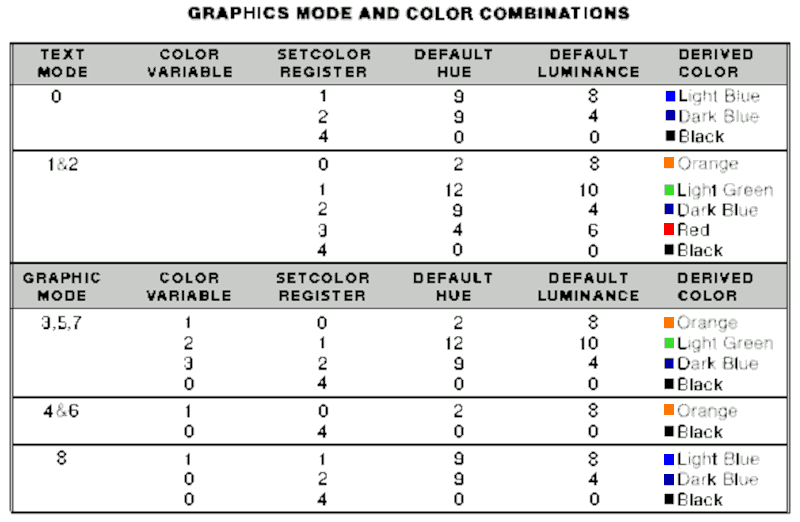
GRAPHICS int-value
int value betwen 0 and 15 for LX and XE - OR - between 0 and 11 for the 400/800.
Base
Graphics Mode Antic Mode Colors Resolution Display mode
0 2 2 40 x 24 Text
1 6 5 20 x 24 Text
2 7 5 20 x 12 Text
3 8 4 40 x 24 Graphics
4 9 2 80 x 48 Graphics
5 A 4 80 x 48 Graphics
6 B 2 160 x 96 Graphics
7 D 4 160 x 96 Graphics
8 F 2 320 x 192 Graphics
9 - 16 80 x 192 Graphics
10 - 9 80 x 192 Graphics
11 - 16 80 x 192 Graphics
12* 4 5 40 x 24 Text
13* 5 5 40 x 12 Text
14* C 2 160 x 192 Graphics
15* E 4 160 x 192 Graphics
* for XL and XE computers only
 Example:
100 GRAPHICS 0
Example:
100 GRAPHICS 0
INPUT store-value
Example:
100 INPUT X
LEN
PEEK
PLOT
POKE
PRINT
Outputs to the display screen.
; can be used between numbers and string variables.
Examples:
100 PRINT "HELLO WORLD"
100 PRINT A;" ";B
100 PRINT PEEK(43234)
REM
Program documentation. Documentation can be entered after the statement without
effecting the program.
Example:
100 REM THIS LINE DOES NOTHING
RND
SETCOLOR number,number,number
The first number is the color register, the second number is the hue, and the
last number is the luminance.
There are 16 hues to choose from and 8 luminances for each hue.
The intensity of the text, the color and intensity of the screen, and the color
and intensity of the border are controlled in Graphics 0 by three SETCOLOR statements.
SETCOLOR 1,0,Y = Text intensity
Y can be any even number from 0-14, to change text from dark to bright.
SETCOLOR 2,X Y = Screen color and intensity
X can vary from 0 to 15 to change the color of the screen and text,
and
Y can be any even number from 0-14, to change intensity of screen color from
dark to bright.
SETCOLOR 4,X,Y = Border color and intensity
X and Y are the same as when setting the screen colors.
The first digit in the SETCOLOR statement specifies that text, screen or border
are to be changed.
This digit (in Graphics 0) may have a value of 1, 2, or 4 only.
The second digit specifies color, and may vary from 0-15. This holds true for
both screen and border.
Colors selected by the second digit are as follows:
1 = text
2 = screen
4 = border
HUE
Number Color
0 Gray
1 Gold
2 Orange
3 Red-Orange
4 Pink
5 Violet
6 Purple Blue
7 Blue
8 Light Blue
9 Blue-Green
10 Turquoise
11 Green-Blue
12 Green
13 Yellow-Green
14 Orange-Green
15 Light Orange
Intensities are roughly:
0-2 = Dark
4-8 = Medium
10-14 = Bright
SOUND variable1, variable2, variable3, variable4
variable1 is voice register. values 0-3
variable2 is sound pitch values 0-255 255 = lowest pitch
variable3 is distortion values 0-14 0 = no distortion
variable4 is volume. values 1-15 15 = full volume
Only Four Octives available.
variable2 Pitch Notes Frequency
243 Low C 131  230 C# 138
  217 D 146
  204 D# 155
193 E 164
182 F 174
204 D# 155
193 E 164
182 F 174  173 F# 184
162 G 195
153 G# 207
144 A 220
136 A# 233
128 B 240
121 Middle C 256
114 C# 279
108 D 293
102 D# 311
96 E 329
91 F 349
85 F# 369
81 G 391
76 G# 415
72 A 440
68 A# 466
64 B 493
60 C 523
57 C# 554
53 D 587
50 D# 622
47 E 659
45 F 698
42 F# 739
40 G 783
37 G# 830
35 A 880
33 A# 932
31 B 987
29 Highest C 1046
173 F# 184
162 G 195
153 G# 207
144 A 220
136 A# 233
128 B 240
121 Middle C 256
114 C# 279
108 D 293
102 D# 311
96 E 329
91 F 349
85 F# 369
81 G 391
76 G# 415
72 A 440
68 A# 466
64 B 493
60 C 523
57 C# 554
53 D 587
50 D# 622
47 E 659
45 F 698
42 F# 739
40 G 783
37 G# 830
35 A 880
33 A# 932
31 B 987
29 Highest C 1046
STICK(stick-value)
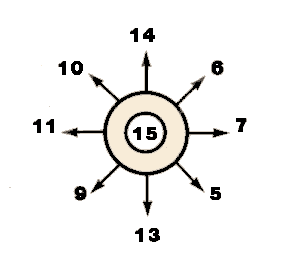 7 = Right
11 = Left
13 = Down
14 = Up
Example:
100 IF STICK(0) = 11 THEN GOTO 500
7 = Right
11 = Left
13 = Down
14 = Up
Example:
100 IF STICK(0) = 11 THEN GOTO 500