 | Back to Tandy CoCo page
ABS (numeric) - Computes absolute value Example: 100 V = ABS(5)
ASC (str) - Returns ASCII code of first charactr of specifed string. Example: 100 A = ASC( T$ )
ATN (numeric) - Returns arctangent in radians. Example 100 Y = ATN(X/3)
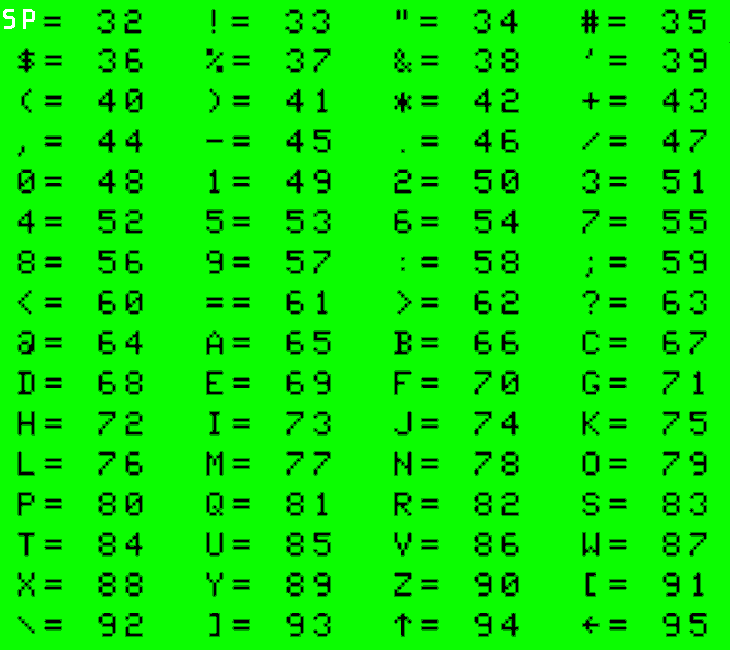
CHR$(n) - used to find character from ASCII code. Below is a partial table printed on the Tandy (32 being a space):
 CHR$ can also be used to print graphic characters in default
text/semigraphics mode. This is also set with the command PMODE 0,[X] .
CHR$ can also be used to print graphic characters in default
text/semigraphics mode. This is also set with the command PMODE 0,[X] .
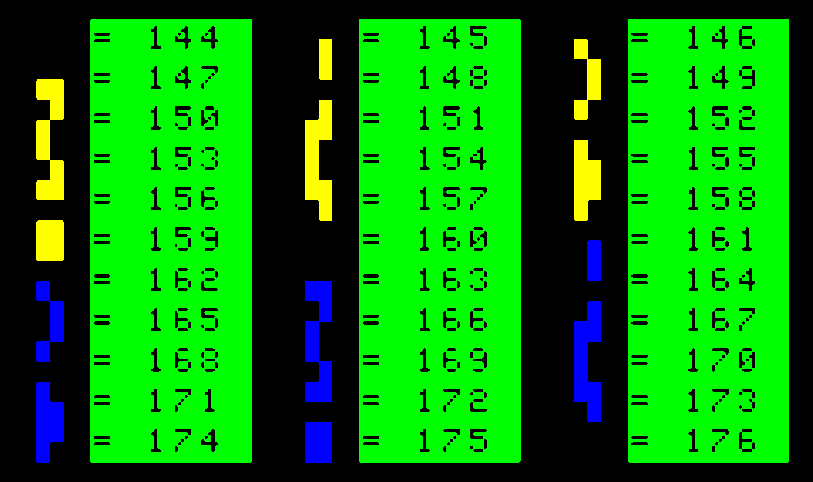
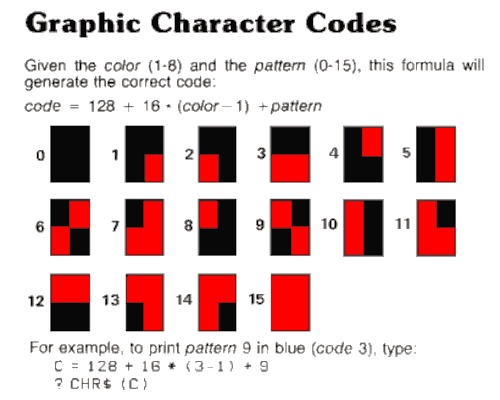 Starting at 128 are the Graphic Blocks
Colors for Coco 2 with Extended Color BASIC 1.x
Starting at 128 are the Graphic Blocks
Colors for Coco 2 with Extended Color BASIC 1.x
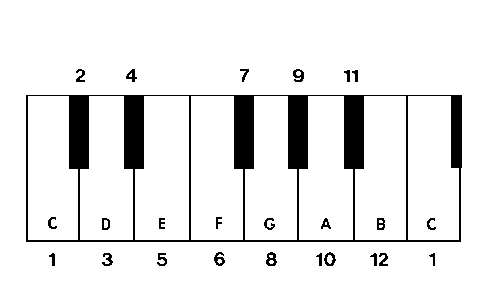 Note: PLAY does not recognize the notation B# or C-.
Play A note:
PLAY "A"
Add another note:
PLAY "A;A#"
Add pause
PLAY "A;P2;A#"
Change Volume
PLAY "V5;A;P2; V10;A;P2; V30;A;P2"
Change Note Length
PLAY "L2;A;L4;A;A;L2;A;A"
Note: PLAY does not recognize the notation B# or C-.
Play A note:
PLAY "A"
Add another note:
PLAY "A;A#"
Add pause
PLAY "A;P2;A#"
Change Volume
PLAY "V5;A;P2; V10;A;P2; V30;A;P2"
Change Note Length
PLAY "L2;A;L4;A;A;L2;A;A"
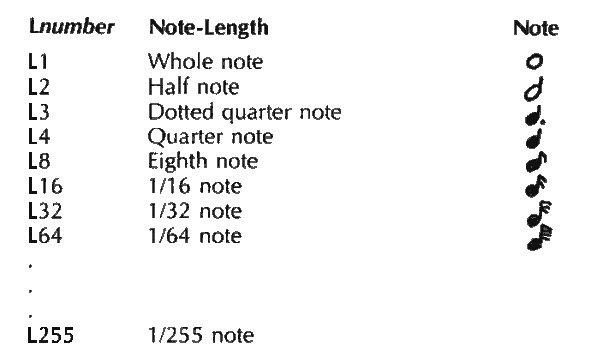
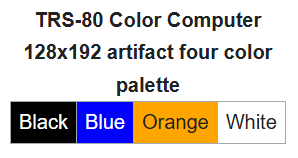
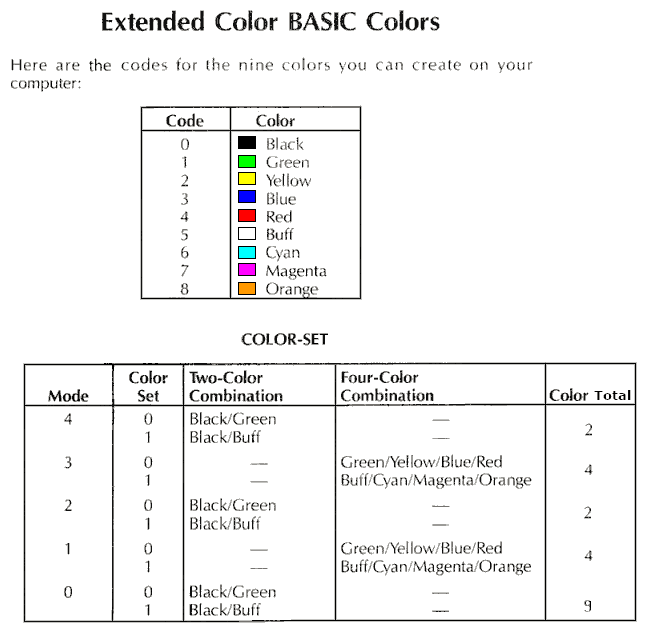 Use the SCREEN command to choose the color palette of the mode.
Example:
10 PMODE 4,1:SCREEN 1,1 'Set graphics mode
20 PCLS 0 'Clear screen
NOTE: Something better than these 5 Microsoft defined modes (PMODE).
PMODE 0 is the same as Semigraphics-4 mode or SG4
There are three modes not defined with the PMODE command:
- Semigraphics-6 mode or SG6
- Semigraphics-12 mode or SG12
- Semigraphics-24 mode or SG24
Like SG4, SG6, SG12 and SG24 can also use all colors available.
Semigraphics-24 mode (SG24) is basically a 64x192 character screen with the
9 colors in a 4 on and 4 off pattern - giving the user a 64x192.
This mode is like crossing PMODE 0 and PMODE 4.
Use the SCREEN command to choose the color palette of the mode.
Example:
10 PMODE 4,1:SCREEN 1,1 'Set graphics mode
20 PCLS 0 'Clear screen
NOTE: Something better than these 5 Microsoft defined modes (PMODE).
PMODE 0 is the same as Semigraphics-4 mode or SG4
There are three modes not defined with the PMODE command:
- Semigraphics-6 mode or SG6
- Semigraphics-12 mode or SG12
- Semigraphics-24 mode or SG24
Like SG4, SG6, SG12 and SG24 can also use all colors available.
Semigraphics-24 mode (SG24) is basically a 64x192 character screen with the
9 colors in a 4 on and 4 off pattern - giving the user a 64x192.
This mode is like crossing PMODE 0 and PMODE 4.
 Example image created in the SG24 mode.
Semigraphics-24 (or SG24) is a "hybrid" display mode that combines text and
graphics modes to achieve a unique 9-color display that is much better than
the PMODE 0 9-color display.
Key Technical Details
Mechanism: It works by tricking the Motorola 6847 Video Display Generator (VDG).
By setting the Synchronous Address Multiplexer (SAM) to a high-resolution graphics
mode while leaving the VDG in an alphanumeric/semigraphics mode, the screen is
subdivided into smaller "slices".
Resolution: It provides a 64×192 effective resolution. In this mode, each 8×12
pixel character box is split into six vertically stacked blocks, each 4×2 pixels
in size.
Color Palette: It allows the use of all 9 available colors (green, yellow, blue,
red, buff, cyan, magenta, orange, and black) simultaneously on one screen.
Memory Usage: A full Semigraphics-24 screen consumes 6,144 bytes of RAM.
Example code to enable the SG24 mode:
10 CLS
20 POKE &HFF22,0 : REM RESET VDG TO SEMIGRAPHICS ZERO IS SG MODE
30 POKE &HFFC3,1 : REM SET SAM TO GRAPHICS MODE (GM1) = 1
40 POKE &HFFC5,1 : REM SET SAM TO GRAPHICS MODE (GM2) = 1
50 POKE &HFFC0,0 : REM ENSURE SAM RESOLUTION BIT 0 IS LOW (GM0)
55 REM is set for CG6 Mode while still in SG mode
Example code to enable the SG12 mode
10 CLS
20 POKE &HFF22,0 : REM RESET VDG TO SEMIGRAPHICS ZERO IS SG MODE
30 POKE &HFFC3,0 : REM SET SAM TO GRAPHIC MODE (GM1) = 0
40 POKE &HFFC5,0 : REM SET SAM TO GRAPHIC MODE (GM2) = 0
50 POKE &HFFC7,0 : REM ENSURE VDG IS IN ALPHANUMERIC MODE
-
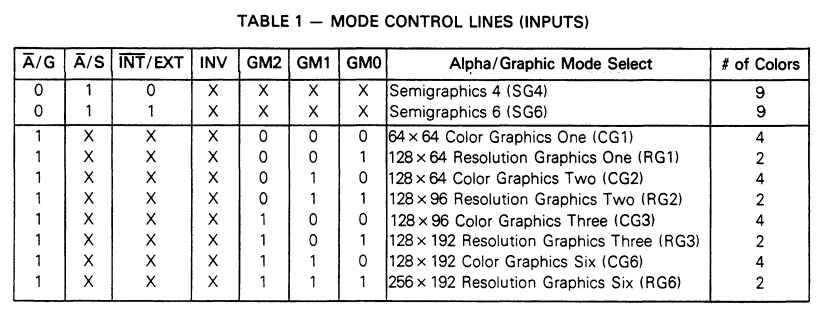
Note on POKEs and what they are for (see table 1 above):
POKE &HFF22,0 Resets the VDG to SEMIGRAPHICS - ZERO is SG Mode
POKE &HFFC0,0 V0 clear
POKE &HFFC1,0/1 V0 Set to 0 or 1
POKE &HFFC2,0 V1 clear
POKE &HFFC3,0/1 V1 Set to 0 or 1
POKE &HFFC4,0 v2 clear
POKE &HFFC5,0/1 V2 Set to 0 or 1
Example image created in the SG24 mode.
Semigraphics-24 (or SG24) is a "hybrid" display mode that combines text and
graphics modes to achieve a unique 9-color display that is much better than
the PMODE 0 9-color display.
Key Technical Details
Mechanism: It works by tricking the Motorola 6847 Video Display Generator (VDG).
By setting the Synchronous Address Multiplexer (SAM) to a high-resolution graphics
mode while leaving the VDG in an alphanumeric/semigraphics mode, the screen is
subdivided into smaller "slices".
Resolution: It provides a 64×192 effective resolution. In this mode, each 8×12
pixel character box is split into six vertically stacked blocks, each 4×2 pixels
in size.
Color Palette: It allows the use of all 9 available colors (green, yellow, blue,
red, buff, cyan, magenta, orange, and black) simultaneously on one screen.
Memory Usage: A full Semigraphics-24 screen consumes 6,144 bytes of RAM.
Example code to enable the SG24 mode:
10 CLS
20 POKE &HFF22,0 : REM RESET VDG TO SEMIGRAPHICS ZERO IS SG MODE
30 POKE &HFFC3,1 : REM SET SAM TO GRAPHICS MODE (GM1) = 1
40 POKE &HFFC5,1 : REM SET SAM TO GRAPHICS MODE (GM2) = 1
50 POKE &HFFC0,0 : REM ENSURE SAM RESOLUTION BIT 0 IS LOW (GM0)
55 REM is set for CG6 Mode while still in SG mode
Example code to enable the SG12 mode
10 CLS
20 POKE &HFF22,0 : REM RESET VDG TO SEMIGRAPHICS ZERO IS SG MODE
30 POKE &HFFC3,0 : REM SET SAM TO GRAPHIC MODE (GM1) = 0
40 POKE &HFFC5,0 : REM SET SAM TO GRAPHIC MODE (GM2) = 0
50 POKE &HFFC7,0 : REM ENSURE VDG IS IN ALPHANUMERIC MODE
-
Note on POKEs and what they are for (see table 1 above):
POKE &HFF22,0 Resets the VDG to SEMIGRAPHICS - ZERO is SG Mode
POKE &HFFC0,0 V0 clear
POKE &HFFC1,0/1 V0 Set to 0 or 1
POKE &HFFC2,0 V1 clear
POKE &HFFC3,0/1 V1 Set to 0 or 1
POKE &HFFC4,0 v2 clear
POKE &HFFC5,0/1 V2 Set to 0 or 1