Tandy/Radio Shack Color Computer (CoCo and CoCo2).
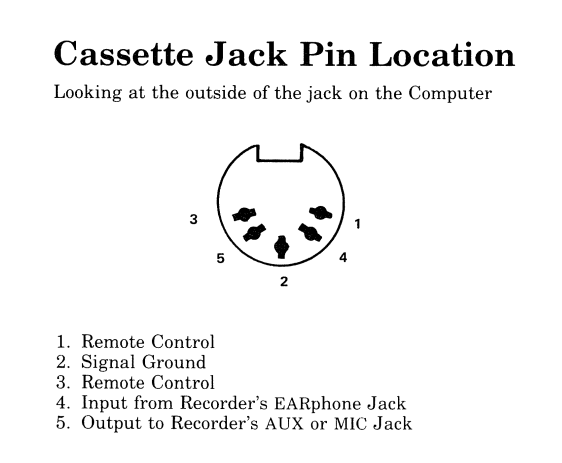
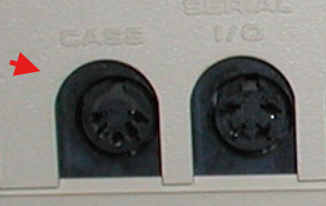
Cassete Tape interface
|
 |
 Steps to Save to Cassette (CoCo 1, 2, or 3):
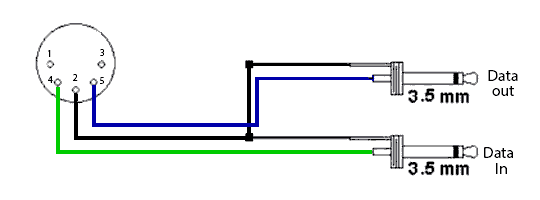
Connections: Ensure the cassette recorder is connected to the back of the CoCo
using the 5-pin DIN cable.
Issue Command: At the OK prompt, type CSAVE "FILENAME" and press ENTER.
Wait: The screen will go black while saving.
The computer will return to the OK prompt when the saving is complete.
Verify: It is recommended to press STOP, rewind the tape, and use CLOAD "FILENAME"
to verify the program was saved correctly.
Important Notes:
Filename: Use a simple filename, up to 8 characters.
Volume: If you have trouble saving or loading, adjust the volume level
(usually moderate or low is best).
Steps to Save to Cassette (CoCo 1, 2, or 3):
Connections: Ensure the cassette recorder is connected to the back of the CoCo
using the 5-pin DIN cable.
Issue Command: At the OK prompt, type CSAVE "FILENAME" and press ENTER.
Wait: The screen will go black while saving.
The computer will return to the OK prompt when the saving is complete.
Verify: It is recommended to press STOP, rewind the tape, and use CLOAD "FILENAME"
to verify the program was saved correctly.
Important Notes:
Filename: Use a simple filename, up to 8 characters.
Volume: If you have trouble saving or loading, adjust the volume level
(usually moderate or low is best).