CHR Example: CHR 224 will display the Greek lower alpha
CLR Clears calculator screen
DFN Used to set functions to the function keys. Format: DFN Fx:aaa@aa Example: DFN F1: R4D@R4 This will set function key #1 to display "R4D" and goto label (LBL) R4 when pressed.
GTL Goto a Label
GTO Goto a step
HLT Halts or ends the execution of the Program
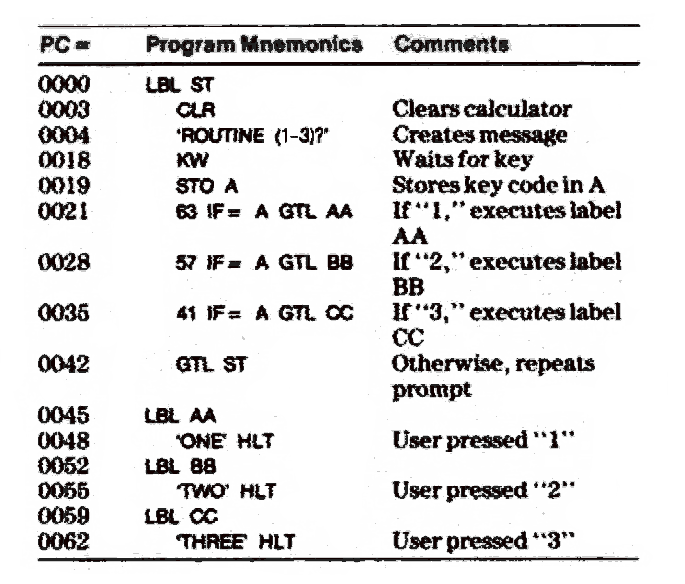
IF Check a value or condition If can be 'IF=', 'IF>', 'IF<' Example: 55 IF= A GTL CD is like writing: IF A equals 55 then goto label CD
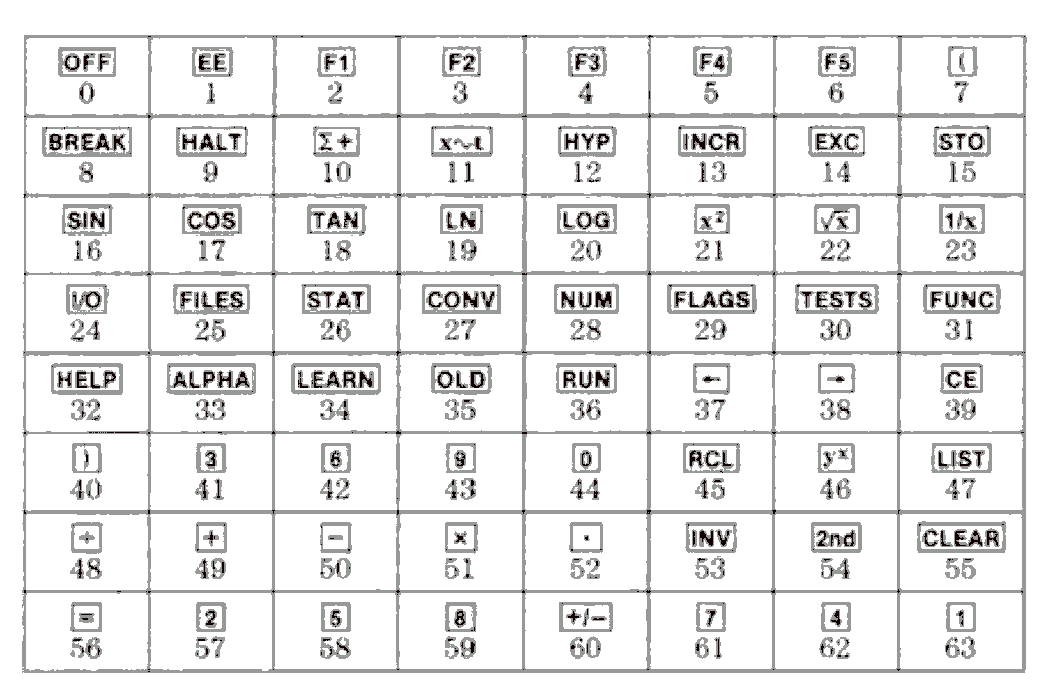
KW Key Wait - waits for a key press. If used for capturing the key pressed, see the key press chart.
LBL The label command two characters long label is max
PAU Pauses for one second.
PUT Saves file
R# Create a Random number Example: 'ROLL 6D' KW (6* R# +1) INT HLT Will create a random integer between 1 and 6
SBL Sub to a label and return with the RTN (return) command
SBR sub to a step number and return with the RTN (return) command
STO Stores a value into a variable. Example: KW STO A Stores the key press into A.
RTN Return from a sub routine. See SBL
Example code
 Key codes for key capture
 Common functions:
Function Field
CHR nnn
CIO nnn or X
COL nn
DEV nnn
DF aaa
INV DF aaa
DFA Fx:aaa@nnnn
DFN Fx:aaa@aa
DFN CLR
DSZ nnn or X
INV DSZ nnn or X
EXC nnn or X
FIX n
GET aaa
INV GET aaa
GTL aa
INV GTL nnnn
IF< nnn or X
IF= nnn or X
IF> nnn or
INC nnn or X
INV INC nnn or X
IND nnn or X
LBL aa
MRG nnn or X or =
NAM aaa
PUT aaa
INV PUT aaa
RCA nnn or X or =
RCB hhhh
RCL nnn or X
RD aaa
RF nn
SBA hhh
SBL aa
SF nn
SHW n
TF nn
INV TF nn
VFY aaa
WID nn
WRT aaa
Common functions:
Function Field
CHR nnn
CIO nnn or X
COL nn
DEV nnn
DF aaa
INV DF aaa
DFA Fx:aaa@nnnn
DFN Fx:aaa@aa
DFN CLR
DSZ nnn or X
INV DSZ nnn or X
EXC nnn or X
FIX n
GET aaa
INV GET aaa
GTL aa
INV GTL nnnn
IF< nnn or X
IF= nnn or X
IF> nnn or
INC nnn or X
INV INC nnn or X
IND nnn or X
LBL aa
MRG nnn or X or =
NAM aaa
PUT aaa
INV PUT aaa
RCA nnn or X or =
RCB hhhh
RCL nnn or X
RD aaa
RF nn
SBA hhh
SBL aa
SF nn
SHW n
TF nn
INV TF nn
VFY aaa
WID nn
WRT aaa